Poshy Tip - jQuery Plugin for Stylish Tooltips
I almost hear you asking - why another jQuery tooltip plugin? Well, I actually never planned creating this plugin until I reached the final stages of designing this website and decided to add some pretty tooltips. So I started looking for a tooltip plugin that allows easily creating stylish tooltips and also includes the most useful features for such a script. However, I wasn't pleased with the results I found so I ended up writing a completely new plugin and am now making it available for all.
Demos
You might be eager to take a look at some examples so here is the demo page right away. And below you will find a short introduction.
Notable Features
OK, so apart from the awful name, is there anything interesting about this tooltip plugin?
A Single Background Image for Scalable Tooltips
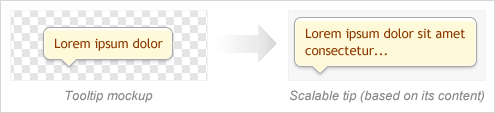
Suppose you need to code a scalable tooltip that looks like this (i.e. a tooltip with auto width/height based on the content inside it):
The Usual Approach
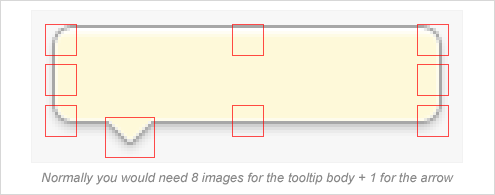
To achieve this with most similar plugins out there you would need to slice the image into multiple separate images - for the corners of the box, for the sides, etc.:
The Poshy Tip Approach
But since the tooltips only work when JavaScript is enabled anyway, why not apply some JS magic which would make our life easier and save our server some additional requests? This is exactly what Poshy Tip was designed to do. With this plugin, you can create a scalable tooltip by just using a single background image for the tooltip body:
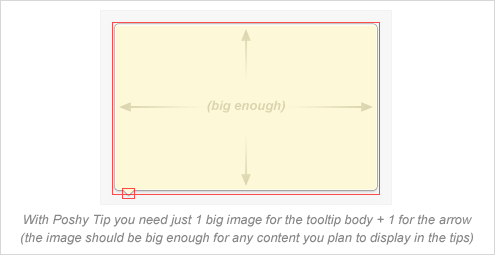
You need to create one big image for the tooltip body - e.g. something like 1024x768 pixels (which should be enough for anything you may want to display inside a tooltip in the browser viewport). You then have to set it as a background image for the tooltip container DIV in the most trivial way:
.tip-yellow {
	...
	background-image: url(tip-yellow.png);
}
Poshy Tip detects when a background image has been set for the tooltip container DIV and creates a scalable frame from it that wraps the inner contents of the tip. Finally, you just need to specify what should be the size of the background image frame around the inner content by setting the following option:
bgImageFrameSize: 10 // pixels
And the result:
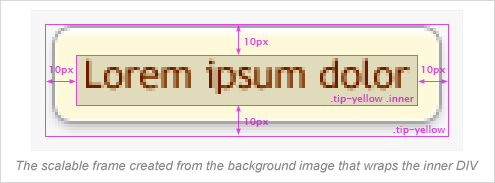
You can, of course, tweak the margin/padding of the inner DIV if needed.
Advanced Positioning Options
With Poshy Tip you can position the tips relative to the mouse cursor or to the target element and align them in every possible way horizontally and vertically (note the alignTo, alignX and alignY options). In addition the script makes sure the tips are always displayed in the browser viewport and also automatically positions the arrow (if available) on the appropriate side of the tooltip body.
Asynchronous Loading of the Tooltip Content
Poshy Tip supports using a function for returning the tooltip content and the script also passes an update callback function as an argument to this function. By using this callback, you can easily update asynchronously the content of the tooltip after it has been displayed. You can see a quick example on the demo page.
Documentation
You can find usage examples and a list of the options and methods available on the demo page.
License
Like jQuery, Poshy Tip is dual licensed under the MIT and GPL licenses.
Git
The Poshy Tip source code is also available at GitHub:
git clone git://github.com/vadikom/poshytip.git